
February 07, 2011
Against chrome: a manifesto
by Steven Poole
Please tear your eyes away from this elegant and curiously seductive prose for a few seconds and look at what surrounds this webpage on your display. Unless you are browsing in full-screen "kiosk" mode or kicking it old-school with Lynx, chances are your browser program is designed to look like some sort of machine. It will have been crafted to resemble aluminium or translucent plastic of varying textures, with square or round or rhomboid buttons and widgets in delicate pseudo-3D gradients, so they look solid, and animate with a shadowed depth illusion when you click them. Me, I hate this stuff. I think it's not only useless but pernicious and sometimes actively misleading. Won't you please join me in declaring a War on Chrome?
By "chrome" I don't mean Google's browser of that name, but all the pseudo-solid, pseudo-3D visual cruft that infests user interfaces in modern computing. For an example of Chrome Gone Wild I need only turn to Apple, who have somehow acquired a reputation for elegant and minimalist user-interface design while perpetrating monstrosities like this:
Can you tell what that does, and how to work it? Me neither, and I've been using it for years. (It is the Ultrabeat drum machine in Logic.)
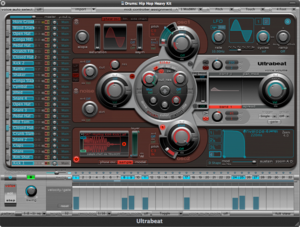
Now, this kind of severe chromatosis is particularly widespread in music-making applications, perhaps hoping to assuage the gear-nostalgia of composers who once had actual knobs and buttons to play with but now are reduced to pretending to operate pretend knobs and buttons on a screen. That's the only reason I can think of for this, a kind of glorious reductio ad absurdum of rampant chromiology, in Reason:

Yes, you do actually have to pretend to plug those pretend cables into the pretend holes in order to change the audio routing.
Chrome arises from a chronic case of object-envy. We like interacting with physical objects in the real world, goes the reasoning, so it will presumably be more pleasant to interact with computer software if it pretends to be a physical object too. But why? Couldn't the appeal of using a computer be that of a world precisely without friction and texture, a world where things are weightless, virtual and easy? I'm writing this in the fullscreen view of Writeroom, an entirely chrome-free environment whose virtues I have sung elsewhere, and the simplicity is like a refreshing mental breeze.
Chrome not only wastes space — think of the extra information that could be displayed if you got rid of all those pseudo-metal or pseudo-plastic frames and edges — but it adds another layer of wonky metaphor onto what already is the embarrasingly incoherent paradigm of modern computing. Oh, right, so there are windows on my desktop? What's that about, exactly? That mode of design is "metaphorics", defined thus by Eric Freemand and David Gelernter in "Beyond Lifestreams" (Beyond the Desktop Metaphor, MIT 2007):
Metaphorics is a method of building software based on comparisons of software to objects or machines in the real world (e.g., to the physical desktop in the world of office furniture).
Well, the aggregate system of "metaphorics" in today's UI design is tottering and nonsensical. It's time to scour away the accumulated sediment of imaginary hardware and furniture, time to chuck out the chintz.
Perhaps the most absurd and brainachingly stupid example of needless chrome I am aware of, the most terrifying villain on the loose in this episode of Chromewatch, comes from — oh, hello again, Apple!
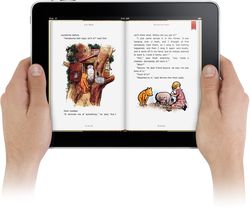
This is the iBooks app. Notice how lovingly the designers have made it look like you are in the middle of reading a physical book by drawing a little pseudo-3D evocation, down each vertical side, of the pages you have read and the pages you have still to read. What do you think this looks like when you are on page 2 of a book, or 2 pages from the end? I'll tell you what it looks like: exactly the same. It still looks like you are right in the middle. That's correct: because of the sentimental and unnecessary chrome, the app ends up lying to you about where you are in the text you're reading.
I don't know about you, but my eyes hurt. And so, for some much-needed relief, to the perhaps surprising hero of this story: Microsoft. Despite it's frighteningly boring name, the Windows Phone 7 operating system is in the vanguard of what I fondly hope is an anti-chrome revolution:

Isn't that beautiful? Clean, neat, efficient and stylish in its display of information. (People are already customizing their Android phones for a similar minimal look.) I say that flat is the new black; that 2D is the new avant-garde; that a surface doesn't have to be ashamed of being a surface. Technology users of the world, unite: you have nothing to lose but your bas-relief buttons. Let us march forwards together, spurning chrome, into a cleaner, lighter future.
Posted by Steven Poole at 12:10 AM | Permalink


Comments
Is one allowed to tighten those sagging audio cables for a cleaner look, or is that not allowed because you can't do that in real life?
Posted by: Sagredo | Feb 7, 2011 3:48:51 AM
To be fair to apple, Logic looked like that before they got their grubby mitts on it. Although it does beg the question, why haven't they improved it? They must have literally bought emagic and all their staff and let them get on with it.
I really hate turning virtual knobs, not an easy task to do with a mouse!
Posted by: Greg | Feb 7, 2011 7:59:32 AM
RE: "Yes, you do actually have to pretend to plug those pretend cables into the pretend holes in order to change the audio routing." It's been a few years since I've used Reason (since version 3), but back then I believe that I turned off the visualization of the cables and instead used nested contextual menus to connect one jack to another. Reason's still a great example of your point, though - and perhaps an even better example would be the "Reason-in-your-browser-clone" audiotool.com, which, as far as I know, can't even be hooked up to physical devices to "retrieve the object" from the computer again.
RE: "I really hate turning virtual knobs, not an easy task to do with a mouse!" I totally empathize with your pain. In fact, my hatred of "mousing around" led me to Linux years ago, where I use a tiling window manager and control everything from scripts in the command line, and where text-based audio like Supercollider in Vim can reign supreme over GUI toolkits like Reason. Even my Firefox browser has Vim keybindings via an add on - I don't have to click on a thing. I'm editing this comment in Vim as we speak.
But to every person who uses my computer, all these efficiencies are crypto-interfaces; they make everything impossibly hard for them. There's definitely a point at which a visual metaphor can help a user; for example, it helps a user understand "pressability" when a button becomes shadowed when you mouse over it.
I'm not sure that I'm ready to rail against examples like iBooks and Reason, though, since they are driven by commercial interests that actually preempt usability. For Apple, sentimentality is actually more marketable than functionality; a new apple product is always 9% innovative features, 91% feeling and sentiment. It sounds like the real problem with iBooks is is the "uncanny valley" of representation; they need to complete the simulation and make the thickness change as you read the book.
As for Reason, one of the original selling points was that Propellerheads was trying to take an entire rack out of your studio and put it in your laptop. The idea was that you would buy hundreds of dollars worth of software as a replacement for thousands of dollars of hardware. Their customers wanted things that looked like the things they replaced; this was in the era (2000) before every audio engineer was also a computer programmer.
I think that ideally, every piece of software would be three layers. First would be an exposed API that programmers could call. Second would be a CLI for advanced users that could issue a text command that would be translated into an opcode that would call the API. Third would be a GUI for basic users where a button press would generate the same opcode as the text command. Many programs are developed this way, but by no means the majority ...
Posted by: Myer Nore | Feb 7, 2011 10:15:26 AM
The basic problem is the inappropriate use of visual metaphor, yes. While we do want virtual tools to have some relation to the physical ones they replace, wholesale replication is not the way to go.
I've used Logic since its Atari days (as Creator/Notator) and yes, Apple did pretty much leave the Emagic crew alone to continue what they'd been doing. This was a bit surprising considering Apple's leadership in thoughtful UI. (e.g., the economy of having a single menubar that changes to reflect which app is frontmost, etc.)
Reason's (which I also use) rackmount metaphor has the virtue of making clear that its components have the same relationship as in real life, but, again, why not improve on "reality" - tighten those cables, indeed! They already do that by allowing one to minimize individual rack components to reduce the amount of scrolling. They're inconsistent.
The lack of consistency in most apps' and plugins' rotary controls is another annoyance. some map them to a vertical linear motion of the mouse/trackpad, some to a circular, (and a few to a horizontal linear), and within those are variations in acceleration mapping (for a non-music illustration of that, compare the motion of a mouse in Windows when you change your motion speed to that of an mouse in Mac OS X; the Apple one is much smoother.)
I too dislike the corner-cutting in the iPad ebook rendering: if you're going to make it look like a book, yes, you should reproduce the visual cue that tells you by the number of tightly packed lines on either side of the open page(s) how far into the book you are. Otherwise, don't bother with it at all, or display some non-reproductional data like a simple number. It's jarring to have something that sort of looks like but doesn't behave like the real thing. (I remember a criticism, back in the 90's, of Apple's folder and full trash icons that pointed out that they look exactly the same no matter how full they are. Again, corner-cutting which undermines the communication of useful information. No doubt it was deemed too hard or too expensive to build it in.)
Knowing when to abandon a metaphor is the beginning of wisdom in UI design.
Posted by: Kai Matthews | Feb 7, 2011 10:25:33 AM
I totally friggin' agree. See Ableton Live for a better attempt.
Posted by: Rob | Feb 7, 2011 11:52:01 AM
Could NOT agree more. We've built an entire company on this same philosophy. See here: http://www.calvetica.com
Posted by: Mysterious Trousers | Feb 7, 2011 12:08:30 PM
I would agree with you on most points, and Apple is moving to the "full screen" view more and more (especially with Lion), which is thankfully eliminating some of this cruft. Even Safari has its "Reader" mode which helps some, but there is a ways to go.
Regarding the iPad and iBooks.... While the iBooks interface could be improved to do some of the minor tweaks you mentioned, I have to admit that I was shocked by a very positive experience I had when first using iBooks. I found myself actually fingering the edge of the iPad bezel trying to get a finger on the page so I could physically turn it. It was at that point that I felt the iPad was indeed "magical" in some way. It gave me the illusion (like a magician) of a physical book with a virtual book. I knew then that I wanted to own all my books in digital form -- then I had the sad realization that the selection of digital books on any reader is far inferior to what is available in physical form.
Posted by: BC2009 | Feb 7, 2011 12:09:21 PM
While I partially agree, did the cognitive dissonance involved in posting this to a blog featuring a fake calligraphic handwritten-look font with fake torn paper in the header hurt much?
Posted by: droppedD | Feb 7, 2011 12:10:14 PM
I'm not sure I agree entirely, particularly with your conclusion that "flat is the new black."
While some of the examples you cite are truly horrendous, you may see no reason to stretch the physical metaphor into the computer, most of these apps were written not for experienced computer users, but for neophytes who may have extensive experience in the analog domain and are apprehensive in the physical one (iBooks, etc). In this case, the UI is helping to bridge the gap from the world to which the user is accustomed to the new world in the computer.
Also, I personally find that pseudo-3d/real-world user interface elements make it far easier to see them and understand which elements are active/inactive/highlighted/selected. A wonderful example of this is the iBooks highlighting feature, which looks dramatically better than the bland, flat, Kindle equivalent.
Posted by: Brad | Feb 7, 2011 12:12:41 PM
This is already happening. The visual metaphors of folders, windows, desktops, etc. are intended to comfort users unfamiliar with computing concepts, and ease them into it. (E.g. "Directories" are scary, but I know what "folders" are for.)
The saturation of computer technology into the lives of the average person is not nearly as deep as it is for those of us who work with computers every day. So that level of comfort is still necessary to usher in new users, and get them settled.
But we're moving in a new direction in terms of UI design now. Call it "quasi-physical" for lack of a better term. That is, objects representing data on a screen contain some characteristics of physical objects, but couldn't exist in real life.
For example, the rows of icons on an iPad/iPhone screen, or the tiles on a Windows 7 phone. You can touch them, push them, move them around, and their design is a cue that you can do so. Cover Flow or carousel designs are similar. Another move in this direction are the tabs on the Chrome web browser, which are all the way at the top, making the window less physically "real" but still perfectly understandable.
This evolution will likely continue and be refined until the remaining vestiges of imitating physical objects are only used in very specific situations where they are most apt. The rest of our interfaces will have evolved into new metaphors, which will make sense to us but would probably seem completely alien to previous generations.
Posted by: Jeff Edsell | Feb 7, 2011 12:14:47 PM
As someone who writes almost every line of code and essay paragraph in vim, one of the least chrome infested applications in the world, I wholeheartedly sign onto your manifesto and declare my readiness to man the barricades. Down with metaphorics, viva simplicity!
But Myer Nore has it right above. There are good reasons, largely economic, why companies ignore much of what you've written here and continue to sell flashy-ware. My Mom (and people like her) is reason one, bless her. But even many seasoned technologists love chrome. People are lazy; old paradigms seem to offer an easy way out, even when that leads to inefficiency. And who said the goal for most people is usability? Cool sells, and companies know it. The decades of "how can we sex up Linux," and the Gnome project's slow ejection of features is symptomatic.
Posted by: Cyrus Hall | Feb 7, 2011 12:15:37 PM
the 90's called, they want their old "Kai's powertools GUI is not-standard therfore bad" argument back.
seriously...
I've been hearing similar arguments againt reason rack and cable mataphor since it was intruduced... but I have yet to see ANY* program in its class that can rival reason for depth in signal routing possibilities. the cables are there for reasons that go way beyond shallow skeamorph design issues.
and regarding those shallow design issues... reason caters to a perticular set of users, and so does logic - and those markets appriciate the visual language that is used in those applications.
now.. when accounting software uses 3D graphic metaphors...
Posted by: herenot | Feb 7, 2011 12:16:03 PM
Having been a former pro-app support person, I can tell you that Apple primarily bought Logic to create GarageBand, and they left Logic mostly alone because the Logic userbase are more deeply entrenched in their ways than almost any other app, since it has slowly evolved since the 80's. Every time Apple tweaked some small thing in Logic I would get a dozen angry Germans calling me to pitch a fit.
Posted by: Wiley | Feb 7, 2011 12:18:30 PM
Tend to agree about iBooks, but it is also the only reader app on the iPad where first-time users know which direction to swipe. It's a bit over-the-top kitschy (and as others point out, not as useful as it could be), but affordances are important.
Jakob Nielsen's review of the first round of iPad apps pointed out that many went for a completely flat "chiseled glass" look, a la Kindle or Instapaper; it's beautiful, and easy on the eyes, but doesn't provide cues about what is clickable and what isn't. (See e.g. the Yelp iPad app for an especially egregious example. I dare you to tell me what's clickable the first time you see it.)
Posted by: dc | Feb 7, 2011 12:18:43 PM
I agree with the sentiments, but other than the music examples, the examples you give are terrible.
iBooks's design reflects the fact that >99% of books are designed to be read in that format. The existence of the Chrome reflects the intention of the typesetters of the book. Once ebooks are the predominant target of book publishers, the chrome will not be useful anymore.
And how is the WP7 screenshots you have shown arguing your point in anyways? In fact, with the spatial distribution of WP7's layout, your argument against iBooks (it gives you no sense of where you are) applies much more to the WP7 screenshot you have placed here. And your argument makes no sense for iBooks (people usually read books sequentially) but a lot of sense for the Windows Phone (people don't usually access "apps" sequentially).
This article, which had tremendous potential, ends up looking like "Look how clever I am. I showed that a company lauded for design, actually has terrible design, but the one whose design is laughed at, actually has awesome design".
Posted by: addicted | Feb 7, 2011 12:18:56 PM
The word you're looking for is 'skeuomorphic'.
Useful sometimes, other times not, and definitely overused sometimes. But other times, useful as a transition device as technologies change.
Posted by: GQB | Feb 7, 2011 12:22:36 PM
I couldn't agree more about iBooks except on one point: it takes second place to the new iCal (iPad and MobileMe versions). I say it's worse because Apple's rendered it (literally) so much more useless than it was before. We're supposed to be moving *forward* not *backward* but sadly, "the [metaphor] has become the message." I didn't spend $2000 of my hard-earned money on a state of the art MacBook Pro to look at vestigial artifacts that serve no other purpose than to clutter my workspace with "cuteness." That's why I prefer Microsoft Excel 2011 to Apple's Numbers. Cute, get out of the way, so I can get back to work!
Posted by: Mark Aceto | Feb 7, 2011 12:23:40 PM
One counterargument specifically about the Ultrabeat UI (and pretty much any other instrument in Logic): the layout and varying sizes of the controls help the user remember which control does what with a quick glance. If you change the View from "Editor" to "Controls," you'll get a bewildering series of sliders and drop-downs that are indistinguishable apart from their 10-point-font labels. In the case of music editors, with so much going on, I think the UI needs to have a spatial layout. That said, the cables in Reason are ridiculous and could be executed in a much more clutter-free way.
Posted by: Joe | Feb 7, 2011 12:23:53 PM
Why is it music apps in particular that seem to be so egregious in this regard? Look at Aperture which has a lightbox type metaphor but not to the detriment of using the app.
(To the person who put up calvetica - you chose to replace apps where Apple already doesn't have much cruft, to use a print font for the screen, and have reduced features on top of it all. Not impressive and more an exercise in a graphic designer's wet dream than a UI designer (although most people confuse the two).)
Posted by: anon | Feb 7, 2011 12:25:30 PM
But seriously, are you saying that we should just go back to text-only word processors with keyboard combos for tagging?
The tech priesthood completely forgets that for the vast majority of users, real-world references are actually useful. Most people don't have the time or inclination to learn obscure interface methods, and physical representations have a real place for the 'great unwashed'.
Sorry, but this smacks of elitism.
Posted by: GQB | Feb 7, 2011 12:26:51 PM
I agree with much of this post, but I have to say that I like using iBooks the best out of all of the ebook applications on the iPad. It's the most fluid, has lots of features and is attractive to look at for long periods of time.
The Amazon ebook app with flat pages has a weird feel to it. Simply adjusting the visual metaphor to show how far you are in a book would go a long way to fixing iBook's UI. But overall it's pretty good.
Hopefully Apple keeps up much of the minimalism of iOS. The desktop metaphor of OS X, Windows, etc has come and gone. It's led to unnecessary clutter, unnecessary multitasking and an inability of people to keep their files organized.
Posted by: Patrick Thornton | Feb 7, 2011 12:27:38 PM
Interesting, I want more! When I saw 'Manifesto' in the title I nearly sent it to Instapaper, because I thought it would be thorough case. The Reason tools were good examples, but I feel like your iBooks example confused the message. Are you saying if they just made the pages chrome match where you are in the book then it would suddenly become good? I don't think so, but I'm not sure. The mention of Windows Phone 7 is awesome, I wanted more of your thoughts. This is not a manifesto, but a preview to a manifesto. I want more.
Posted by: Jon Dokulil | Feb 7, 2011 12:39:02 PM
Those WP7 screenshots really irk me. I think WP7 has a good interface, but honestly, all they have done in these screenshots is replaced chrome with emptiness.
The screenshots are heavily heavily information light. Even the "tiles". The huge phone icon + 2 message is achieved far more effectively in less space on the iPhone with the Phone App icon + a discreet badge with the number 2. The former presents itself solely as a display. The latter also gives you information that you can click on it to open that particular application.
Posted by: addicted | Feb 7, 2011 12:43:15 PM
You're setting up a straw man, which needless to say, is unfair. You need to compare comparable UI on comparable platforms, not the most egregious UI on certain platforms against the best UI on other platforms.
The thing is that chrome, when used properly, has a purpose. It shows users what things are clickable buttons and what things are informative text / images. I've been using Windows Phone 7, and let me tell you this "clean" OS look is significantly less usable.
Look at this: http://www.celularis.com/wp-content/uploads/2010/10/Windows-Phone-7-email.png -- can you tell me which parts of the UI are clickable and which parts of the UI are informative text? No! Color doesn't indicate anything, the title of the email is colored, but isn't a click target. Those tiny icons on the right side are actually hit targets. When you click the attachment, it turns into a click target for the Cancel Download. But the entire run of text for the attachment is a button... so if you tap the attachment name to start downloading it, and then tap it again to open it, the download will actually be cancelled.
By using some chrome, it is much clearer what is a button and what is just a run of text. You've highlighted some examples where this is taken to preposterous proportions, but the fact of the matter is that chrome is necessary if you want users to be able to use your software without constantly trying to figure out what parts of the UI are purely informative and what parts of the UI are actionable.
Posted by: Stephen | Feb 7, 2011 12:58:17 PM
haha, if you can't figure out how to use ultrabeat after using logic for years then you must have a problem understanding synthesizers in general.
one of my favorite plugins, that one is. made sense to me after about 10 minutes after using it the first time. I don't understand what people don't get about it. It has a very static signal flow, it's not like it's modular.
Posted by: Ultrabeat Fan. | Feb 7, 2011 1:04:43 PM
Good article, although a lot more could be said on the topic. And using the Readability bookmarklet to strip away the blog chrome really helped.
Posted by: Dethe Elza | Feb 7, 2011 1:12:34 PM
My 25 year old self probably would have agreed with you 100% (and I’ll admit that Logic plug-in is hideous… like a bad jam box from the 90’s). All of us in the visual design fields have notions about purity drilled into us in school (with architecture it was all about “honesty” and “integrity” of materials). But then I got out of school and into the real world and I realied that clients (or users in the case of UI design) just aren’t as enamored with design ideologies as we are. Many, if not most, just want something they can grasp. They don’t want to live in a world of in your face hyper modernist abstraction. They need at least some clues, some reference to the past even if that past doesn’t really exist anymore.
I’d be willing to bet that you have some of these references around in your own life. Does your home, for example, have ceramic tiles that are pretending to be stone or cement board that mimics real wood siding? Or columns or lintels that aren’t actually structural? What about faux wood or metal accents in your car that are actually plastic? Or plastic embossed to look like leather? I’m not crazy about this stuff either but I do understand why many people are drawn to it. And as lovely as it is, I’m guessing that many regular users would find visual cues they already understand from the physical world a whole lot more intuitive than the flat, ultramodern navigation of Windows phone 7. And isn’t making something intuitive what UI design is all about? I’m certainly happy a UI like Windows Phone 7 exists but I’m not sure many people would appreciate a world in which every product available conformed to the same design ideology.
Posted by: minimalist | Feb 7, 2011 1:13:31 PM
"iBooks's design reflects the fact that >99% of books are designed to be read in that format. The existence of the Chrome reflects the intention of the typesetters of the book."
Careful who you are speaking for. Except for PDF books, which don't allow you to resize the text, eBook formats completely flame the designers decisions about fonts, spacing, line and page breaks, initial caps, etc. Designers hate that.
You could write algorithms to control for line-spacing, widows & orphans and the like, but the end result will be to obsolete the role of the designer. They'd hate that too.
Posted by: Carlos | Feb 7, 2011 1:15:24 PM
I can agree with the basic point... to a point. For the average non-technical person, visual metaphors beat text commands (or a CLI) for learning to use a PC any day.
My biggest pet peeve is the absurd "page turning" effect that's used in nearly every digital book or magazine. It's absolutely pointless.
At any rate, better the current "chrome "interface "look" than the visual UI nonsense epitomized by the Kai Krause "look"... where visual and organic "experimenting" was more important than achieving usable and consistently practical results. I despise programs (and particularly Photoshop plug-ins, where the Kai Krause look runs rampant among UI designers) that still go for an "organic" feel.
Posted by: John | Feb 7, 2011 1:18:21 PM
This manifesto reminds me of this classic takedown of the Quicktime 4 Player UI:
http://homepage.mac.com/bradster/iarchitect/qtime.htm
Posted by: Marijane White | Feb 7, 2011 1:23:56 PM
Equally amusing to me are icons - smaller versions of the same idea.
Look at your phone - it likely has a "call" button shaped like an old landline telephone handset, an "email" button that looks like an envelope, a search function (Android) that's basically a magnifying glass (!), perhaps a camera function that looks like the camera I got rid of in favor of my phone's camera app...
But these things are useful, when first transitioning to the new technology!
Posted by: John Moran | Feb 7, 2011 1:36:08 PM
Max/MSP is where its at.
Posted by: Darek | Feb 7, 2011 1:49:54 PM
I question your thinking-through of things because you fail to consider in the case of paper books that the object itself IS the document and the UI and the feedback.
In iBooks, in landscape orientation there are facing pages (and margins) because there need to be two columns for readability.
There need to be margins in either orientation for the same reason there are margins in paper books: that's the region for note-taking (or at least note markers)
So, two columns, with while space around them, and you're reading a book, a new concept on electronic handheld devices relative to paper-bound editions.
Why WOULDN'T you make it look like (and in one mode of interaction, actually turn graphical "pages")?
You're forgetting that version one of any software- especially early/first versions of any new category of software are tasked with two major goals: usability and instruction. The former carries throughout all versions. The latter is unique to the initial version, where the software must also instruct the user in the ways of the new paradigm, usually by gentle introduction through transitional forms (e.g., highlighting and dictionary lookup, trans-device syncing, multiple bookmarks, localized short-taps for page-turns, reading progress-bar IN ADDITION TO a page-based location-finder)
I think iBooks is a standout application that nails most of its requirements with style.
Kindle is an eyesore that suffers from too little feedback, especially in "swapping in" a new page of text (did that tap just register or not because I blinked when it happened), to say nothing of its lack of purchase integration.
Posted by: God of Biscuits | Feb 7, 2011 1:56:28 PM
Just in case anyone here thinks the UIs imposed on us by Logic and Reason are due to their age, and designers are smarter about that kind of thing now, here's something that shipped last year on the iPad:
http://www.sonicstate.com/news/2011/01/03/korg-ipad-synth-gets-midi-control/
Posted by: Vince T | Feb 7, 2011 2:06:08 PM
I think stuff like iBook comes down to the same issue that plagues the Apple Dock - a very demo-sexy feature that makes sales, but is actually counter-productive on usability.
I can sympathize with that need - you always want to have a feature that demos really well with your target audience (which is *very* broad for Apple) - it's exceptionally hard to sell things that take a few weeks to appreciate. ;-)
That said, I'm more concerned w/ overly-skeuomorphic designs like iBooks (which I can't circumvent while using), vs. the Apple Dock, which is the rare case of something I can avoid using almost entirely (with alternatives like Spotlight, Quicksilver, or Alfred).
Posted by: Jon S | Feb 7, 2011 2:08:36 PM
There's a big difference between "chrome" and metaphors that help usability. You could argue that folders, windows, and buttons are essentially "chrome." Usability can increase if you can use "real world" objects to help people understand how to use software. In that regard, iBooks is brilliant.
The answer isn't to declare war on chrome. You should direct your criticism at the designer who aren't sensitive enough to tell that their decoration is hurting the usability.
Posted by: Adrian3 | Feb 7, 2011 2:08:50 PM
the examples are sad. You choose the most complex interface ever for the chrome style and a mobile interface to compare it. Man try harder next time.
I want to think like you, but you are not even close to make a point.
Posted by: José | Feb 7, 2011 2:11:15 PM
You do have a good point in some of these cases, but if you honestly think the rack and cabling in Reason are just a gimmick, you've completely missed the point of Reason.
I use Logic as well, and I absolutely agree that the Ultrabeat UI is horrendous. I do understand how it works (it's really not that complicated), but the tiny text is hard to read, and the tiny controls are infuriating to work with. There's nothing about the UI that's beneficial in any way, and evidently it's also confusing for some users.
Here's the thing though. Apple didn't design Ultrabeat or any of the other Logic plugin interfaces. Those were all designed by Emagic (either before or after the Apple acquisition; while they're technically part of Apple now, they still have a separate office in Hamburg where all of that stuff is done). I've used Logic since version 4, and to a veteran user, it's really obvious which parts of the UI were designed by Emagic, and which parts were done by Apple. Take a closer look at the ES1, ES2, EFM, etc.; it's clear that Ultrabeat was designed by the same people who did all of the previous plugin UI for Logic. After the Emagic acquisition, Apple assigned a couple of its own designers to clean up the overall application, and considering how complex it is, they've done a remarkable job.
As for Reason, it doesn't deserve to be lumped in with the rest of your examples of bad UI. As I said before, if you believe it's gimmicky or inappropriate, you simply haven't understood it yet. Maybe you're just not the tinkering type. For someone who does enjoy creative routing and experimentation, the rack and cabling concepts are brilliant. Lots of old school synth/gear heads love Reason — and immediately understand how it works — because of the great UI design.
Posted by: Stormchild | Feb 7, 2011 2:13:17 PM
Windows Phone 7 in the vanguard?
?
?
?
Okay.
Moving on.
I'm quite sure Logic is responsible for representing a lot more information than a phone, and a third visual dimension adds another spectrum for doing so.
I'm sure improvements could be made to all of the examples you mentioned, but optimizing their graphical representations would certainly still leverage some "chrome" elements as representatives of relationships, scopes, statuses, etc.
Advanced technologies are already too squared off, riddled with tables and lists and other such gridded contraptions. To some extent it sounds like you're confusing all aesthetics as being akin to mere dessert. IDK, it just seems to me that obliterating "chrome" alone is too simplistic. But I did like your article, thanks for getting me thinking :)
Posted by: Gretchen B. | Feb 7, 2011 2:20:05 PM
I support this. Default UI is best UI. The best thing for end users is something they can understand.
Posted by: Ben Kulbertis | Feb 7, 2011 3:24:29 PM
It sure was useful for the screenshot pages (not mere images) to resize my entire browser window.
Posted by: Colby Russell | Feb 7, 2011 3:30:33 PM
In pretty much all audio unit instruments, it's possible to switch the UI to Apple's generic version. There's far less chrome, near-flat controls, but at the same time it renders them completely cryptic and utterly unusable, even though functionally the controls are identical.
Reason's cables DO automatically change their length to match. I'm an old-school audio type, so I quite like the routing metaphor. In Logic you need to do exactly the same thing, but buses and connections are listed in pop-up menus which you have to read in order to see what's going where, and you need to keep a model of the routing setup in your head because there isn't a visual representation at all. That's fine if you understand the concept to start with, but a disaster otherwise - not the same quality or quantity of information that Reason gives you at a glance.
It's all very well having simple interfaces for simple things (e.g. how many calls you missed, the need to scroll a pane), but a simple interface to complex things often means you lose most of the power.
I have another musical parallel for you: Yamaha's DX7 had simple flat controls with plain typography and neatly labelled menus for everything. Compare that with the comtemporary Prophet 5 which was a mass of knobs and buttons. You could figure out the basics of a P5 in a few minutes: the DX7 could take you years.
vi/vim is a pet hate of mine. I find it raises user-hostility to an art form. While I can understand the depth and flexibility it offers, for me it will always be the text editor that lost me a week's work in one keystroke.
Posted by: Marcus | Feb 7, 2011 3:58:03 PM
Imo this is all a matter of taste. I personally think WP7 looks cheap and a bit too easy, like those 3-year-old-toys. But that's my personal opinion, and I think the best anyone can get to everyone liking your design, is making it great but providing an easy customization option.
Posted by: daniel | Feb 7, 2011 4:15:19 PM
Great post. Am amused that I tweeted about WP7 after reading the first paragraph of your post, only to notice later that you had already considered that example.
Posted by: Ashish Goel | Feb 7, 2011 4:19:21 PM
I generally agree with the sentiment. It's why my favourite way to read on the iPad was Instapaper, not iBooks. Also agree with the above commenter about the iPad's calendar. That thing is a horror to use. Just awful.
Posted by: Nick | Feb 7, 2011 4:21:26 PM
I get your point, but here is the thing.
iPads and iPhones are selling like hot pancakes with free chocolate sauce,while Windows 7 phones are selling like brussels sprouts.
I understand your philosophy moving towards "Chromeless". But that the end of the day, consumers vote with their wallet, and it seems that chromelessness don't sell.
Perhaps chromelessness is not what consumers want?
Theories like these are interesting, but pragmatic business savvy developer should take consumer behaviour into account.
Posted by: BluSky | Feb 7, 2011 4:30:35 PM
I like knobs sometimes. Compare pretty much any OEM car stereo to pretty much any aftermarket car stereo in the display at Wal-Mart. You can't even figure out how to turn some of them on, and their mode-ness means the up button not only turns up the stereo, but adjusts other stuff like the bass and treble with no apparent indication that it's no longer a volume control.
I want controls that offer a recognizable, easy-to-use interface. I don't care if it has knobs or sliders or patch cords or is flat, as long as it's quick and efficient.
Posted by: Matt | Feb 7, 2011 4:35:43 PM
One nice thing about iBooks’s mirroring paper books is that I don’t have to explain how it works to my grandparents.
Posted by: Michael Critz | Feb 7, 2011 4:46:54 PM
As long as what people do on computers is essentially a new way of doing what they used to do otherwise, such broad use of the visual metaphors are inevitable and needed. Never mind the times that such visualization can often communicate complex structures far more efficiently than any other method.
When you can start doing things on the computer that you can't do in the "real world", once you get past the "why in the world would you want to do that?" block, you can introduce new perspectives on usability. No feature is more pointless or inefficient than the one you can't figure out (or remember) how to use. Usability trumps everything.
Joe
Posted by: Joseph Futral | Feb 7, 2011 4:49:51 PM
Chrome is just plain ugly. Ick.
Not designed and cool ugly like a Scion or Element automobile. Boring old flat ugly. It is almost as hideous at a Prius, but in a more dull and uninteresting way.
Posted by: MM | Feb 7, 2011 4:53:36 PM
Sorry but I have to disagree with some of this. While I agree that Ultrabeat is confusing, the cable UI used by Reason (and several other systems such as the Modular Moog and Arp 2600 soft synths put out by Arturia) works quite beautifully, particularly for those of us who have spent time with physical modular synthesizers. Not only is it quite intuitive, there's in fact a certain amount of retro pleasure to be had from them when the physical machine is no longer available.
There is no question that skins for skins sake is often useless particularly when the point is to provide a consistent inter-application experience (i.e, Cut/Copy/Paste/Open/Save work exactly the same way in all applications).
But in the case of applications like Reason, they are using a model that's consistent with what users are familiar FOR THAT DOMAIN and that works very well.
Posted by: David Jameson | Feb 7, 2011 4:58:16 PM
Have you enjoyed the mess that is NewTek's TriCaster? It's the Unholy Grail of wanton disasters.
That said, I know that it was done to make people coming from a physical production truck feel like they already knew the software, which in fact they did. So there are solid reasons behind it, but unless they have an option to switch the interface to a modern, never-used-the-physical-equipment-this-is-replacing layout and look, it's going to end up being a mess forever.
Posted by: Kevin Hamm | Feb 7, 2011 5:18:19 PM
Something is telling me you won't like this... :) http://www.secretgeometry.com/apps/cathode/
Posted by: zpjet | Feb 7, 2011 6:16:28 PM
Wow, so many things wrong with this post I'm chomping to swipe them down! :)
Issues Presented:
Basically your entire post boils down to the concept of chrome and how unnecessary waste this presents to the end user. I can almost buy what you're selling if you were to produce actual realistic UI that most common users would actually use vs using a bunch of random crap UI and declaring that all chrome based UI is just like these.
The chosen UI you did present was done so in a manner that embodies an emotive experience with the end user that's contextually relevant to the probable objectives of the said application. These UI's the best for that? depends and it comes down to the end user base for that product and their expectations which are measured accordingly etc. This isn't a Metro vs UI discussion its the equivalent of comparing a fireman to a cop, then blaming the fireman for not being a police officer as well - point two set roles doing two set things differently.
Now comes the concept of why Chrome exists, firstly it's to provide spatial awareness in that providing a sense of boundary in terms of how an application were to socket into an overall platform (in most cases chrome outside a window defines the said window). You can put the UI on a diet but i'd argue given the existing design pattern is in place in order to shrink or reduce the said UI pattern one would need to keep this theme consistent throughout - vNext Windows 8 will do this no doubt, but in all intensive purpose it does perform a function and we humans are actually more in tune with pattern recognition first analyse second (ie your eyes hurting is probably due to your eyesight than actual UI).
lastly, Metro uses the concept of chrome, most of the UI uses large Typography to provide the end user with a sense of context, to highlight to the end user they are in a particular area of the said phone and the navigation / boundary metaphors are the same. The problem I see with this is they are suffering for a polarizing view of minimalist UI vs typography overload so in a way the phone itself has managed to pull of both intrinsic and extraneous cognitive load at once.
If you want to do a comparison in UI a smarter bet would be to put down the Windows Phone 7 UI (which is likely to change given its reliance on black and wastage of space via typography) and instead compare the Future Vision UI concepts produced by Microsoft to realistic applications found in todays market place.
Do a search for Microsoft Sustainability video for one, you'll note that it has a similar metro feel to the entire UI approach but it's actually done in a manner that projects what the "authentically digital" mantra requires.
Windows Phone 7 hints at UI innovation but it fails in execution - case and point the keyboard on the phone is more difficult to pin point the said keys than the iphone / android due to its narrow spacing of keys and lack of boundary / depth - again humans like to have patterns and spatial awareness in order to increase their accuracy in targeting (Fitts Law?)
This post is just misleading.
-
Scott Barnes
Former Rich Platform Product Manager @ Microsoft.
http://www.riagenic.com
Posted by: Scott Barnes | Feb 7, 2011 6:26:03 PM
While the Reason example is crying out for a visual connection UI (as some of the cabling's defenders point out), that doesn't mean it has to look like a mess of cables. Interface Builder, one of the crown jewels of Apple's developer tools, has similar ways to visually connect on-screen controls to the appropriate code.
You could make an argument that this is like wiring, and start "soldering" always-visible wires between buttons and code—maybe even with a cool UI where you "flip" the window over to reveal the tangle of wires on the back!—but that's not what IB does. Instead, a control's attributes are displayed in a sidebar with a circular "outlet" next to each; drag from that outlet, and a line appears connecting it to the mouse pointer. Drag and drop over to another object to make the connection; the list now includes the textual name of that object, and mousing over the attribute highlights the object in light blue.
That being said, I prefer iBooks to the Kindle app. iBooks feels like it's trying to reproduce the experience of a paper book, while Kindle is trying to reproduce the experience of a physical Kindle—and for whatever reason, I'd rather be using a fake book than a fake Kindle.
Posted by: Brent Royal-Gordon | Feb 7, 2011 6:29:50 PM
The "chrome metaphor" was created by William Gibson; from 70's till present the fascination of the tech / metal / machines has been the main driver in people's imagination: Star Trek, Star Wars etc.
It's common sense all of this translated into a chromed GUI; chrome luster means high tech to which most software designers aspire. Chrome is the visual for a far future where all the devices are hyper and ultra: see Gibson's... "Chrome".
I agree chrome lost its charm and today it's easier then ever for this visual archetype to be considered useless: it became out-fashioned. Minimalism will also be out-fashioned in 20-30 years from now.
I love Calvetiva; where's the "reductio ad absurdum", anyway?
Posted by: O | Feb 7, 2011 7:37:15 PM
The "chrome metaphor" was created by William Gibson; from 70's till present the fascination of the tech / metal / machines has been the main driver in people's imagination: Star Trek, Star Wars etc.
It's common sense all of this translated into a chromed GUI; chrome luster means high tech to which most software designers aspire. Chrome is the visual for a far future where all the devices are hyper and ultra: see Gibson's... "Chrome".
I agree chrome lost its charm and today it's easier then ever for this visual archetype to be considered useless: it became out-fashioned. Minimalism will also be out-fashioned in 20-30 years from now.
I love Calvetica; where's the "reductio ad absurdum", anyway?
Posted by: O | Feb 7, 2011 7:56:11 PM
that's all true, couldn't agree more with Steven Poole. really nice article, i hope it wakes up some hyped blind people.
Posted by: Paulgi | Feb 7, 2011 8:01:28 PM
Thanks for a great article and for revealing how many 3QD readers are, like me, UX geeks! That UI design can benefit from leveraging metaphors for familiar experiences is a good point several others have noted. Designers are self-indulgent, it's true, but once in a blue moon we can get someone to fund usability tests to find out if we're smoking crack or not.
Posted by: Carlos | Feb 7, 2011 8:40:59 PM
Equally amusing to me are icons - smaller versions of the same idea.
Look at your phone - it likely has a "call" button shaped like an old landline telephone handset, an "email" button that looks like an envelope, a search function (Android) that's basically a magnifying glass (!), perhaps a camera function that looks like the camera I got rid of in favor of my phone's camera app...
What would you propose to replace these with? Text labels for blank squares? The human brain is much faster to recognize an image than it is to process text.
Skeuomorphic design has its place in giving us interfaces that don’t require excessive thought or rote memorization to use. It’s not appropriate in every instance, e.g. in places where your primary mode of interaction is the keyboard (hello, vim) or where a more fluid and scalable interface is available by breaking away from the real-object abstraction.
What I see when I look at those WP7 or Android screenshots is a whole lot of wasted space. The information density is tiny. And as other commenters have mentioned, going 2D and flat-color means you give up the tiny hints that tell you what is clickable (or tappable) in an interface. Look at the WP7 home screen:
There are seven tasks immediately accessible from that screen, with the rest off on another page, presumably behind that right-arrow at the top right. Nearly a fifth of the screen's vertical and horizontal resolution is wasted in the black space on the right and top. In comparison, the iPhone home screen offers *twenty* things to do.
The WP7 contacts app:
Again, there's a huge amount of completely empty black space at the top, followed by the excessively-large title bar to tell you you're looking at "all" contacts, and then a letter "a" that takes up the same height as one of the rows in the list.
In comparison, iOS gives you nine full rows of names, with a tenth partially visible under the transparent overlay telling you what letter of the alphabet you're at. Also missing from WP7 is the column running down the right side offering a direct jump to any letter of the alphabet.
Windows Phone 7 looks "avant-garde" because it looks completely different from its two competitors. Setting yourself apart is not a bad thing. Doing it by throwing away space on what's already a tiny display may be clean and neat, but it sure as hell isn't efficient.
But what do I know? I'm not a UX expert; nor do I have a design education. I just know what works for me. So enjoy your minimalist interfaces, and go right on ahead throwing out the baby with the bathwater by rejecting everything that looks like it has one tiny bit of "chrome" on it. I'll be over here using whatever interface works best for an application, chrome or no chrome.
Posted by: Sam | Feb 7, 2011 11:39:40 PM
I agree with you in principle, but I think you're missing a rather important aspect of UI design, especially by equating "Apple" with that monstrous first screenshot. There are in fact two distinct trends here.
The first is the appropriation of real-world objects as metaphors in the virtual world. Sometimes, this makes a complicated task accessible (e.g. using postal metaphors for email), but as illustrated by Reason, it can easily go wrong and make things more complicated.
The second, and more important, is the appropriation of real-world visuals such as lighting, texture and motion. We don't use these because they are trendy, but because they work well with the human visual system. Our eyes have evolved to process images from the natural world, not an abstract iconic two-tone vector universe.
Take for example the Gaussian drop shadow, illustrated by this optical illusion:
http://web.mit.edu/persci/people/adelson/checkershadow_illusion.html
Your brain perfectly subtracts the influence of the shadow and gives you a luminance-independent impression of the checkerboard pattern. This makes drop shadows and luminance gradients the perfect tool for adding depth-cues to flat images, for example for segregating one area from another and indicating relative importance. You could do the same with a fat border, but that would be visually disruptive and require you to overemphasize the content to compensate.
Or look at Apple's insistence on animation everywhere: from the way windows minimize, to smooth per-pixel scrolling (now with inertia), to how items arrange themselves dynamically during a drag-and-drop, ... it has an important function. Our eyes have evolved to track objects in motion, not shapes that jump from one position to another. The old-school style of scrolling, where you only jump up/down with discrete steps, makes us lose track at much lower speeds or in our peripheral vision.
Overwhelmingly, Apple's UI choices fit into the second category, not the first. The few examples you show are exceptions, not the rule.
Posted by: Steven Wittens | Feb 8, 2011 1:21:51 AM
Like any food we consume, anything too much is harmful.
A good dish can look ugly, but it may taste good to those who enjoy them.
A bad dish can look pretty, but it may taste bad to those who do not enjoy them.
In the end, it's not about how good, or bad one thing is, but how we deal with them, and how we make use of them.
There's always a choice, and today, most choices are made between something that is extremely poor, and something that is extremely expensive.
Posted by: Will W | Feb 8, 2011 2:15:22 AM
All this, and then there was Friedensreich Hundertwasser!
Posted by: Shefaly | Feb 8, 2011 2:16:19 AM
"Chrome" is obviously a term derived from the use of chrome plating to produce a shiny, yet largely superficial, exterior on common objects, especially on vehicle bumpers. Funnily enough chrome bumpers, when hit, become dented, necessitating repair by a panel-beater (inexpensive). The replacement is the contemporary preference for plastic, body-coloured bumpers - aesthetically more pleasing, but hit one and it cracks, requiring the replacement of the entire bumper (expensive).
...
Posted by: SG. | Feb 8, 2011 2:43:46 AM
Man, I'd love to see your suggestions for how to better present the many knobs and buttons of a soft-synth/drum machine, or a chrome-less way of routing that is better than Reason. My feeling is that the chrome allows a great deal of functionality to be packed in to a very tight space, and has the added bonus that it looks slightly familiar, so you have an idea of how to go about discovering how it works. I think when you went for music software, you chose a bad genre.
What would you suggest instead? I guess I'd like to know, would you keep the same basic layout and just make the graphics plain, or would you totally change things? How would you represent a dial without mimicking a knob? I'm not sure that removing the chrome would make music software any more usable.
I guess Buzz is good example to compare and contrast with Reason. I'm not sure that Reason is any the worse off for it's cable routing metaphor, or it's knobs and dials. In fact, I really used to struggle to set parameters in Buzz, though routing was easy enough. I know it's an unfair comparison, because one is a successful commercial product and the other was a spare-time project.
Anyway, I'm interested to hear what you would like to see instead.
Posted by: Adrian O'Connor | Feb 8, 2011 5:23:29 AM
I really like fancy icons, chrome and graphical gradients effects. Sure, up to a point. It shouldn't waste screen estate, or get in the way of normal usage.
For me, it gives a kind of fun, video game feel to computing. Much better than the bland, boring (Windows, or CDE Unix, eeek) GUIs of the 90's.
Posted by: Wladimir | Feb 8, 2011 6:40:51 AM
As long as the user testings show that more users will quickly find and press a button which has a look of a real button (accomplished by your pseudo effects) all the designers will use such visual style. Because that style sells more of the product the client is selling. 1% more? Sure, use chrome.
Jakob Nielsen showed us numerous times that beautiful is better, that realistic is better. Show us opposite, please.
Posted by: Goran Peuc | Feb 8, 2011 6:52:25 AM
Nice to hear that you're a fan of the WP7 design, fierce reduction of chrome is at the core of the phone's UI design, I've written about this on Ubelly :
http://ubelly.com/2011/01/metro-windows-phone-7-design-language/
Posted by: Andrew Spooner | Feb 8, 2011 7:19:53 AM
I'm all against skeuomorphism in general, as it works against a platform's UI consistency across applications, induces a false sense of familiarity with its visual analogy to real world (which is going to be broken as actual functionality of the UI widgets inevitably diverges from physical objects), and, *most importantly*, it artificially limits the UX design of a software tool to patterns that don't take full advantage of the enhanced possibilities of a computer based GUI interface.
Classical example: calculator apps.
http://www.marco.org/441168915
Said that, I think this article is a bit at fault in pitting skeuomorphism against chromeless UI and minimalism in UI visual styling.
It's a bit of an apples to oranges comparision, those concepts are not polar opposites.
Apple's despised iBooks app is almost as chromeless as the praised Writeroom's fullscreen view.
It just happens to have skeumorphic decoration and page-turning visual clues, where the other goes all-in minimalist.
If you put a faux typewriter background in Writeroom full screen view, it doesn't cease to be a chromeless view (as in not having buttons, toolbars, statusbars, scrollbars, panels etc etc...)
You can skin OS X calculator app to have a delicious flat minimalist visual style, but you still have a calculator app with a limiting skeuomorphic UX.
Ableton Live, cited in the comments, has an UI layout that's free from the skeumorphic limitations of Reason, and a way more minimal visual style, but it still uses non-standard knobs and sliders that in their monochrome simplicity are operated exactly like Reason's overdecorated faux-real counterparts.
And so on. The point is that those concepts are not orthogonal and mutally exclusive.
Posted by: fictionalui | Feb 8, 2011 7:37:08 AM
Evidently those in defense of chrome are in favor of the lowest common denominator. I look forward to a future where UI's are tailored for grandparents, end-users that don't appreciate good design and hate computers. Luddites unite!
Let's try this: instead of "to chrome or not to chrome" we use our imaginations to create the most appropriate metaphor for each medium (phone, tablet, computer)? Obviously, the worst skeuomorphic offenders will stand out for criticism but what about the innovators: Flipboard and Calvetica?
The Delicious generation has jumped the shark. Now is the time for good - innovative - UI design. If it's useful, keep it. If it's not useful, drop it.
One more thing: I'm terrified of the iPadification of my computer. Yes, the Dock and the Finder are lame but what I've seen of the new iPhoto and App Store are lost in translation. Case in point: Mail is long overdue for the iPad/MobileMe UI but iCal is getting worse. One app gets more useful while the other gets more useless. Keep the useful features. Innovate the useless.
OK one very last teeny tiny point: graphite stoplight buttons and scrollbars on "pro" apps. Talk about vestigial! It's like,
"Hey, we know you guys don't use these anymore, so we're slowly absorbing them into the background like a frozen Han Solo. By the time they're gone -- like the floppy disc icon to save -- you won't even know they're missing."
KISS!
Posted by: Mark Aceto | Feb 8, 2011 11:05:17 AM
I've no love for Chrome myself either.
Using Opera here. The only ovvurence of pseudo 3D gradients is just below the tab bar, where the narrowest gradient hints at that all other tabs are behind the current tab. I kind of like it this way.
Posted by: ArabianShark | Feb 8, 2011 12:23:47 PM
Someone give Steve a copy of MS-DOS and shut him up, please.
Posted by: JC | Feb 8, 2011 1:36:57 PM
I'm all against skeuomorphism in general, as it works against a platform's UI consistency across applications, induces a false sense of familiarity with its visual analogy to real world (which is going to be broken as actual functionality of the UI widgets inevitably diverges from physical objects), and, *most importantly*, it artificially limits the UX design of a software tool to patterns that don't take full advantage of the enhanced possibilities of a computer based GUI interface.
Classical example: calculator apps.
http://www.marco.org/441168915
Said that, I think this article is a bit at fault in pitting skeuomorphism against chromeless UI and minimalism in UI visual styling.
It's a bit of an apples to oranges comparision, those concepts are not polar opposites.
Apple's despised iBooks app is almost as chromeless as the praised Writeroom's fullscreen view.
It just happens to have skeumorphic decoration and page-turning visual clues, where the other goes all-in minimalist.
If you put a faux typewriter background in Writeroom full screen view, it doesn't cease to be a chromeless view (as in not having buttons, toolbars, statusbars, scrollbars, panels etc etc...)
You can skin OS X calculator app to have a delicious flat minimalist visual style, but you still have a calculator app with a limiting skeuomorphic UX.
Ableton Live, cited in the comments, has an UI layout that's free from the skeumorphic limitations of Reason, and a way more minimal visual style, but it still uses non-standard knobs and sliders that in their monochrome simplicity are operated exactly like Reason's overdecorated faux-real counterparts.
And so on, the point is that those concepts are not orthogonal and mutally exclusive.
Posted by: fictionalui | Feb 8, 2011 2:58:09 PM
Read what Edward Tufte, renowned expert on information design and visualization, has to say about Windows Phone 7:
http://www.edwardtufte.com/bboard/q-and-a-fetch-msg?msg_id=0003cy&topic_id=1&topic=Ask+E.T.
I agree with addicted's and Stephen's comments above.
Posted by: vastaman | Feb 8, 2011 3:13:24 PM
Massive thread...I'm with you on the horrors of Chrome but with regard to electronic music applications we are talking about the digital/physical modelling of analogue synthesisers. If you're playing a string patch on that then we have add yet another layer of imitation. The chrome is just the visual accomplice, a mere bagman or driver on a team effort heist. (This is not an anti-electronic music comment...I love the ironies buried deep in the genre.)
Posted by: Pete Chapman | Feb 8, 2011 3:29:02 PM
I think that the fake 3D used in audio plugins betrays a deeper conservatism at play in the audio world. The biggest trend in plugins today, apart from Autotune-type pitch correctors, is emulating "classic" analog and digital outboard gear from the 1960's through the 1980's. If you are modeling a specific piece of gear, creating a GUI that looks like the gear is a good decision from a marketing perspective.
The problem is that the UI of a plugin behaves entirely different from a hardware interface. If you are controlling a virtual knob with a mouse, you can only move one knob at a time. Those nifty grooves on the side of a physical knob help the user to easily grip it. On a GUI, they make no difference to the performance. Honestly, a GUI knob that moves in a circular motion is a pain to use (a lesson I found out the hard way when developing my own plugins). Parallel sliders are easier to use on a screen, but the 3D representation of such doesn't give you the ability to control several with one hand.
I have been working toward developing my own 2D design vocabulary for my own plugins (http://www.valhalladsp.com). The design is influenced by Joseph Mueller-Brockmann and the Swiss School, Sesame Street, and my own incompetence at GUI programming. Of the 2 plugins I have up there, ValhallaFreqEcho has a shaggier graphic approach, but a pretty decent user experience IMO (except for the circular slider issue, which I will address in a future update). ValhallaShimmer has better graphic design, but the UI has no hierarchy to help the user out. This is a fairly accurate reflection of the algorithm, which really does have a huge amount of interdependence between parameters, but it has become obvious to me that users need to have a visual representation of what parameters are most important. Future plugins will be designed with a hierarchy-oriented UX, with the "hero" parameters made obvious in the GUI.
As far as music apps and plugins that are less 3D, Chris Randall has been moving in a 2D direction for the most recent plugins at Audio Damage. His "number sliders," where you can control the rate of parameter change by what significant digit you are closest to, is brilliant (I think MAX/MSP has something similar, but the Audio Damage version is way prettier from a design standpoint). Ableton Live has used a "superflat" 2D design style, which I really like.
Posted by: Sean Costello | Feb 8, 2011 3:38:17 PM
I totally agree with you. When i saw the WP7 interface for the first time, i was very impressed.
They really made a fresh looking interface that defies all the common rules.
Kudos for Microsoft
Posted by: Ricardo Jorge | Feb 8, 2011 6:49:37 PM
I'm all against skeuomorphism in general, as it works against a platform's UI consistency across applications, induces a false sense of familiarity with its visual analogy to real world (which is going to be broken as actual functionality of the UI widgets inevitably diverges from physical objects), and, *most importantly*, it artificially limits the UX design of a software tool to patterns that don't take full advantage of the enhanced possibilities of a computer based GUI interface.
Classical example: calculator apps.
( http://www.marco.org/441168915 )
Said that, I think this article is a bit at fault in pitting skeuomorphism against chromeless UI and minimalism in UI visual styling.
It's a bit of an apples to oranges comparision, those concepts are not polar opposites.
Apple's despised iBooks app is almost as chromeless as the praised Writeroom's fullscreen view.
It just happens to have skeumorphic decoration and page-turning visual clues, where the other goes all-in minimalist.
If you put a faux typewriter background in Writeroom full screen view, it doesn't cease to be a chromeless view (as in not having buttons, toolbars, statusbars, scrollbars, panels etc etc...)
You can skin OS X calculator app to have a delicious flat minimalist visual style, but you still have a calculator app with a limiting skeuomorphic UX.
Ableton Live, cited in the comments, has an UI layout that's free from the skeumorphic limitations of Reason, and a way more minimal visual style, but it still uses non-standard knobs and sliders that in their monochrome simplicity are operated exactly like Reason's overdecorated faux-real counterparts.
And so on. The point is that those concepts are not orthogonal and mutally exclusive.
Posted by: fictionalui | Feb 9, 2011 5:52:53 AM
Probably due to my stupidity, I don't get it;
Making stuff look like other stuff to make it readily understandable and thus easier to use is bad and mean because it does not lead people into the disconnected, pure and purely metaphysical age that sure is to come some day? Or:
Overcrowding UIs with ugly eye "candy" is bad and mean because it diverts eye, mind and taste and makes you stupid, ugly and smelly?
Anyways, a perfect manifesto; a large pot of half boiled and disconnected ideas that makes me think.
Posted by: Kaptain Kosmos | Feb 9, 2011 7:58:25 AM
As much fun as it is to poke Apple over isolated examples of gratuitous design fluff, let's remember that they are the ones who started the current less-chrome revolution with iOS (and before that, iPod).
It's their mobile products that have begun moving us into a future without windows, window borders (heck, that started even before on OSX, which PCers continually complain about because they can't stretch the windows from any side), the desktop, folders, drop-down menus, and a number of other traditional must-have chrome and spatial-object metaphors.
Posted by: Ryan | Feb 9, 2011 1:59:44 PM
And while we are lambasting old affordances that are 'needlesly' being reused by application designers - let's add to this manifesto an addendum to get rid of these pesky QWERTY keyboards designed in 1867 to reduce typewriter jamming.
Surely no one on this thread complaining about the uselessness of old technology metaphors is still clinging pathetically to one of those grandma input devices. Or have you all been too lazy to switch your cognitive wiring and muscle memory to a Dvorak or some other obscure but clearly more efficient standard? Tsk. Tsk.
Posted by: Tac | Feb 9, 2011 11:36:25 PM
I think Ultrabeat is a great example and reason is a pretty bad example.
I know what ultrabeat does because i read up on it. I know what reason does because it explains itself. I have an app for the iphone (Inner Ear) that is flat as flat can be when it was all up to me, so I agree that flat can be clearer than not in many cases.
Reason has some inconsistencies, but there is something to the metaphor of 'pretending to plug in those pretend cables' that is lost on dropdowns. Beginners can clearly see and, in a small way, physicalize the connections between the gear.
Posted by: TJ | Feb 13, 2011 9:33:48 PM
Bravo! Many moons ago when I was but a tadpole in art school, they taught us about the 'truth in materials' movement. It's one of the foundations of modern art. Now, whatever you think of modern art is irrelevant. The movement's credo is that any work of art should reflect the materials used to create it. For example, a painting is a 2 dimensional surface. Therefore any attempt to create the illusion of space in that painting is a lie. Digital designers would do well to revisit this philosophy.
Posted by: Tim Parry | Feb 18, 2011 5:37:08 PM
I personally prefer the papyrus look of me old nile delta. I was really upset when the romans started up with their friggn marble %^&*. We just got over the babs with their clay tablets - god they were tough to cary around.
Mixed up a reference for you that i'm using in my
school book.
http://codey.net.au/images/interface/latin.jpg
Posted by: ian hobbs | Mar 1, 2011 9:07:04 AM
I agree for the most part: poor imitations of real world devices are often clumsy and insulting to a user. But I strongly disagree in the case of Propellerhead's Reason.
Reason's aesthetic appeals to me as a musician who grew up using a lot of studio gear. While nearly all competing applications overwhelmed me and got in the way of actually making music, I immediately understood how everything works in Reason.
It's the one case where I enjoy "handling" virtual knobs and cables. Reason's varied devices react exactly how I expect their real-world counterparts to. But a user is not limited to this visual metaphor. When I'm in a hurry or find the cables tiring I use the pop-up text fields or menus as an alternate interface. Propellerhead did an amazing job making their application both extremely powerful and intuitive.
The UI is particularly well-suited to Reason because its core audience's purchase habits are typically based as much on knobs and blinking lights as they are on the usefulness of a product. I doubt Reason would have replaced my formerly jam-packed studio if it didn't offer just as much "toy shop" gizmo joy. It may look ridiculously over-stylized and complicated to a non-musician, but it makes me feel right at home.
Posted by: Mike | Mar 1, 2011 11:43:51 AM
Calling out ultrabeat (and sculpture, the other one that came out at the same time): good. That UI has been a nightmare for anyone using it since before Apple even acquired logic. It has no familiar interface elements for musicians and miniscule hit areas. They are future-UI disasters that show visual design proficiency and information architecture blindness.
Everything else: misinformed. Quoting MIT Press won't help your argument — design is a process, not a deliverable. Reason, iBooks, etc. are amazing examples of helping users find familiar affordance when moving from the physical to the virtual. Their design represents the same values and thoughtfulness as the trash can icon we use to delete files, the gear icons we use for settings, etc. By ignoring the context and the target audience for these interfaces, you miss the point entirely.
Posted by: jm | Mar 11, 2011 2:50:23 PM
Reason has a great UI. In fact I'd say it's one of the few apps where virtual hardware and realistic 3D design is perfectly justified, because it's not just a metaphor, it's a literal representation of audio hardware.
It's much more clear than the interface of something like Ableton Live. A compressor looks like a delay, an audio track looks like a MIDI track. I use Ableton instead of Reason, but that's not because of the UI.
The Logic apps were designed by Emagic prior to Apple's acquisition of their company. People familiar with the old UI would have screamed if they would have drastically change the UI.
Posted by: Evan | Jan 25, 2012 3:45:46 PM
I agree with everything you said ... except for the implicit equivalence of 'avant-garde' with quality and virtue. Why should something strive to be avant-garde more than it should strive to be classic? It is a shapeless adjective that means more or less 'progressive', but ignores the question of how progress can be measured in aesthetics. The only meaningful use of 'avant-garde' is as a synonym for 'novelty', but that does little justice to so-called 'avant-garde' artist who produced more than mere novelty. I think we should do away with this quasi-political term entirely -- born out of treating art like politics, with 'left' and 'right' tendencies -- and talk instead about universal principles of design and how individuals interpret those principles ...
Posted by: Iian | Feb 1, 2012 9:13:58 PM
Post a comment